Migrating a Tableau dashboard to Omni by writing for the CLI, not the human.
Written with the help of Claude Code. Migrations used to be the kind of work you handed to a junior analyst for a month. This is what they look like when you treat them as a software problem instead.
The standard playbook for a BI migration looks the same everywhere. Open the source workbook. Screenshot every chart. Stand up a "Migration Spec" doc. Label the calc fields, trace the joins, call out the WINDOW_AVG, write the field map. Then rebuild the whole thing in the target tool, referring back to the doc like it was a recipe.
The doc is for a human. The rebuild after the doc is for a human. The whole pipeline assumes a person at the wheel, and AI, at best, helps the human write the doc faster.
That framing is wrong, and this post tells you why.
The right framing: the consumer of the migration is not a human. The consumer is the target tool's CLI. Once you accept that, the work changes. You stop writing prose specs and start producing structured intermediate artifacts that the target's CLI eats on the first pass. The Tableau workbook is the source, the Omni documents/import endpoint is the sink, and everything in between is a chain of small, single-purpose CLIs that translate from one shape to the other.
This post is about a Claude Code skill called /tableau-to-omni that does exactly that. End to end, a .twbx becomes a live Omni dashboard in 5 minutes. Here is the architecture and what fell out of building it.
Full 5-minute run, unedited, and then 5 minutes unpacking what happened. The skill works through a real .twbx from unpack to deployed Omni dashboard. Skim it, scrub through it, or save it for later: this is the whole job, start to finish.
Repo: github.com/joshbricel/claude-omni-skills (sanitized, MIT licensed, under skills/tableau-to-omni).
The reframe: design backwards from the target's CLI
Pre-AI migration playbook:
- Open the source tool. Catalog every chart, field, encoding, and layout decision by hand.
- Write a spec doc. Words, screenshots, tables.
- Open the target tool. Rebuild by hand against the doc.
That spec doc is the bottleneck. It exists for a person, and a person is slow. Every minute writing prose for another person to read is a minute the target tool's API is not actually building anything.
AI-native migration playbook:
- Open the source tool. Pull every chart, field, encoding, and layout into structured data.
- Emit an intermediate representation that the target's CLI can consume directly. That intermediate representation is a small set of machine-readable artifacts (YAML, JSON, structured markdown) that mirror the source's meaning in a shape the target understands.
- Pipe that intermediate representation into the target's CLI. Verify. Done.
Step 2 is the unlock. You are no longer writing for a person. You are writing for the program that already knows how to build the dashboard if you just hand it the right shape.
For Omni, that CLI is the documents/import endpoint (plus the YAML model API behind it). One target. One contract. The skill's job is not to be a CLI. The skill's job is to shape the Tableau workbook into the exact JSON and YAML that single endpoint expects.
That is the whole bet. Same bet the build-spicy-deck post made, different domain: separate the part that knows the target from the part that knows the source, and put a structured handoff between them.
What an LLM-friendly intermediate representation actually looks like
A .twbx is a zip with a .twb XML file inside. The XML is three thousand-plus lines of bound-up content, layout, styling, and platform quirks. Every Tableau feature in one nested blob, never meant to be read by anything except Tableau itself.
You cannot hand that to a Claude or a CLI and say "build me an Omni dashboard." It is too much surface area in the wrong shape.
So the first step is to break it apart. The unpacking pass produces a working directory of structured artifacts: the unpacked source, an analysis of the workbook, the YAML to seed, the import payload, and the API response. The exact shape evolves as we add chart types, filter types, and edge cases. The point is the principle: every Tableau concept gets a counterpart artifact in a shape Omni's import contract expects.
That is the LEGO theory. Each Tableau concept (a worksheet, a color encoding, a date filter, a layout zone) gets its own small translation step. Each translation is a thing a junior person could do in an hour by hand. Composed, they are the migrator. Pulled apart, they are easy to test, easy to fix, and easy to extend when the next workbook brings a chart type we have not seen yet.
The architecture in one screen
            ┌────────────────────────────┐
            │  Tableau .twbx (zip+XML)   │
            └─────────────┬──────────────┘
                          │ unpack
                          ▼
            ┌────────────────────────────┐
            │  tableau-source/   .twb    │
            └─────────────┬──────────────┘
                          │ parse XML
                          ▼
            ┌────────────────────────────┐
            │  AI-readable intermediate  │
            │       representation       │
            └──┬─────────┬──────────┬────┘
               │         │          │
       ┌───────▼──┐  ┌───▼────┐  ┌──▼──────────────┐
       │ palette  │  │ tile   │  │ filter + layout │
       │ apply    │  │ build  │  │ build           │
       └───────┬──┘  └───┬────┘  └────────┬────────┘
               │         │                 │
               │         └──┬──────────────┘
               │            ▼
       ┌───────▼────┐  ┌───────────────────────────┐
       │ .view YAML │  │ dashboard-payload.json    │
       │ .topic     │  └─────────────┬─────────────┘
       └───┬────────┘                │
           │                         │ POST /documents/import
           │                         ▼
           │            ┌────────────────────────────┐
           │            │  Omni workbook (created)   │
           │            └─────────────┬──────────────┘
           │                          │
           └──────────► seed YAML ────┤
                                      │
                                      ▼
                       ┌─────────────────────────────┐
                       │  verify every tile query    │
                       │  exit 0 = ship it           │
                       └─────────────────────────────┘
The flow has one target on the right: Omni's documents/import endpoint. Everything on the left is the skill shaping the Tableau workbook into the JSON and YAML that endpoint expects. The translation chain is small, single-purpose pieces (palette, tiles, layout, filters, seed YAML, verify) composed into one run. Adding a new chart type means adding one small piece, not rewriting the migrator.
What ends up on the screen
The cleanest way to see what the skill does is the before and after.
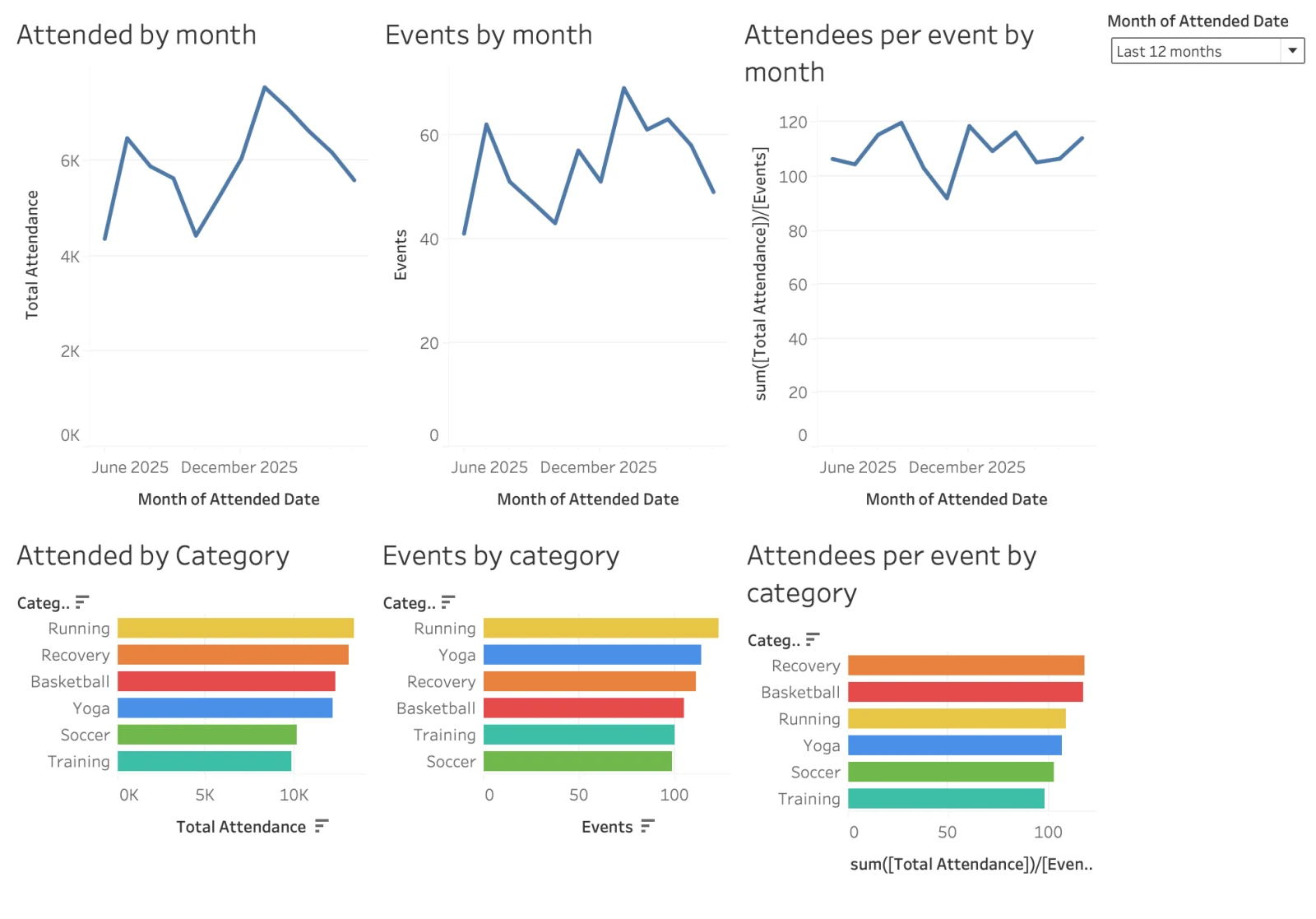
Tableau original. Six worksheets, color by Category, last 12 months.
Migrated Omni dashboard, dark mode. Same six tiles, same encodings, palette consistent by dimension, relative-date filter live and interactive.
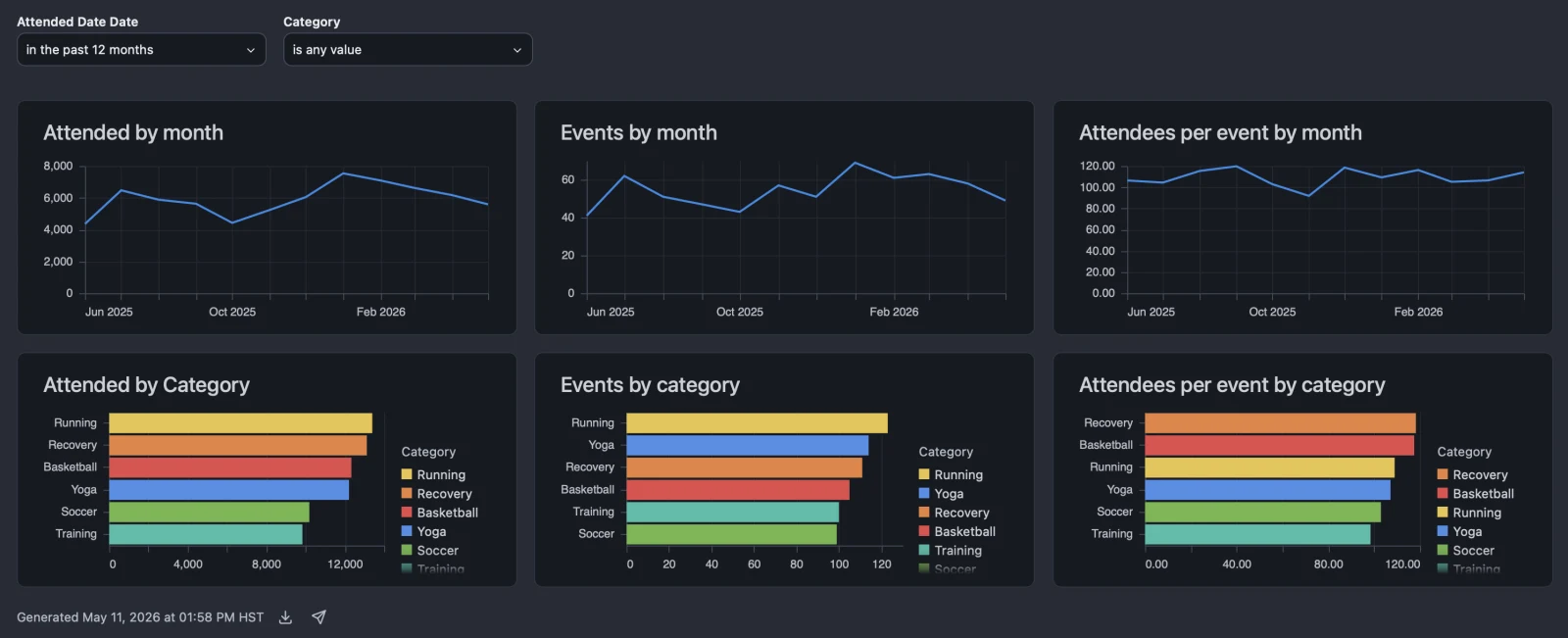
The Omni version is not a screenshot. It is a live, queryable dashboard against the same Snowflake star schema. Drill in. Change the filter. Add a measure. It works because the semantic layer underneath was authored once and reused.
That semantic layer is the other side of this story. The Tableau workbook reads from a fact table joined to seven dims:
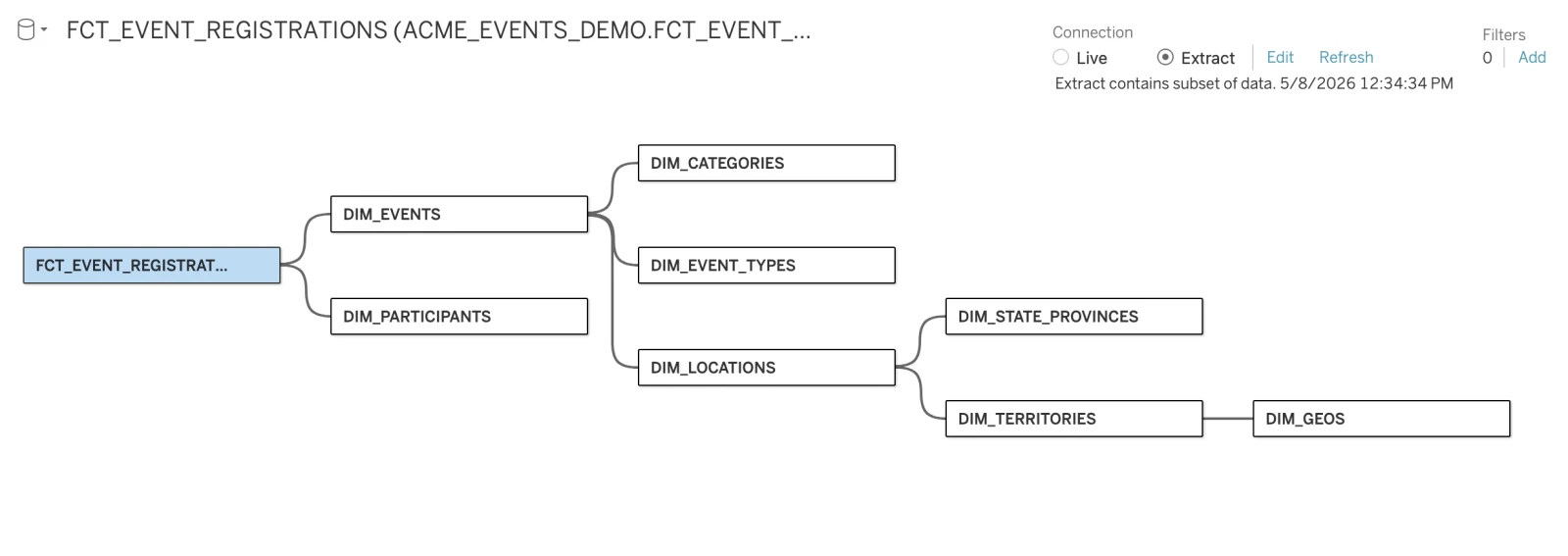
The same star schema becomes a single wide view in Snowflake, then a single Omni view with named dimensions and measures. The Tableau workbook had one fact and seven dims. The Omni model has one view. The translation collapses the joins into the semantic layer so the dashboard tiles can stay flat.
Where AI fits
I do not prompt Claude with "migrate this Tableau dashboard." That is the wrong altitude. The skill orchestrates Claude to do specific things at specific stages:
- Parse the TWB XML into a structured intermediate representation. This is where an LLM is genuinely useful: extracting calc fields, axis mappings, mark types, and layout zones out of messy nested XML and producing a clean intermediate. A regex-based parser would take weeks. Claude with a parsing guide takes a single pass.
- Map Tableau fields to Omni dimensions and measures. This is fuzzy.
Amountin Tableau might betotal_amountin Omni, or might need a new sum-measure. The LLM is good at the fuzzy match; deterministic checks downstream prove it stuck. - Author missing YAML. If a topic does not exist yet on the target model, Claude can draft it from the intermediate representation. A separate semantic-layer skill takes over from there.
Everything else is deterministic Python. The payload builder, the YAML seeder, and the verifier all run without an LLM in the loop. The LLM is on the messy edges; the structured middle stays deterministic. That split is the whole skill in one sentence.
Takeaways
- Migrations are not docs. Migrations are inputs to a CLI. Stop writing a recipe for a person. Start writing inputs for the target tool's importer.
- The end consumer is the API, not the engineer. Design the intermediate representation for the program that already knows how to build the dashboard. The engineer only orchestrates.
- Build small translation steps that compose, not a monolith. Each Tableau concept gets its own small piece. They are easier to verify, easier to fix, and easier to extend when the next workbook brings a chart type you have not seen yet.
- The LLM lives on the messy edges. Parsing XML, mapping fields, drafting YAML: that is where Claude is genuinely useful. The structured middle stays deterministic. Do not ask the LLM to do a job a Python function can do better.
- The intermediate representation is the moat. The TWB XML is the dialect; the intermediate representation is the meaning. If the target's API changes tomorrow, or we point at a different target entirely, the intermediate representation survives. The translation chain is replaceable. The intermediate representation is not.
Try it
The sanitized skill is on GitHub: github.com/joshbricel/claude-omni-skills under skills/tableau-to-omni. Clone it, drop a .twbx next to it, run /tableau-to-omni path/to/dashboard.twbx, and you get an unpacked workbook, an intermediate representation, a seeded workbook, and a deployed dashboard. Fork it, point it at your own Omni connection, and migrate.
If your team has a backlog of Tableau dashboards and you want a senior person plus AI to clear it in a quarter instead of a year, that is what we do. Senior talent. AI-native delivery. Ready to add some spice?