The Tableau to Omni migration pipeline
How to cut the toil and focus on the work that sets you up for success in a modern data environment.
Every organization I talk to that is considering a BI platform migration, say Tableau to Omni, is stuck on the same three fears, and none of them are about the tool.
- Timeline. "We have hundreds of workbooks. Nobody can tell us if this takes two months or two years."
- Same problems, new logo. "Our Tableau estate is a mess of duplicate data sources and conflicting metric definitions. Won't we just recreate that mess in Omni?"
- Payoff. "After all that effort, do we actually get anything new, or just the same dashboards somewhere else?"
These are reasonable fears, because the traditional answer to all three is "hire consultants, screenshot every dashboard, and rebuild by hand for a year." We built something different: a pipeline of Claude Code skills that runs the migration as six deterministic phases, with a human sign-off gate between the ones that matter. This post walks through the whole pipeline, phase by phase, and is honest about the split that actually matters:
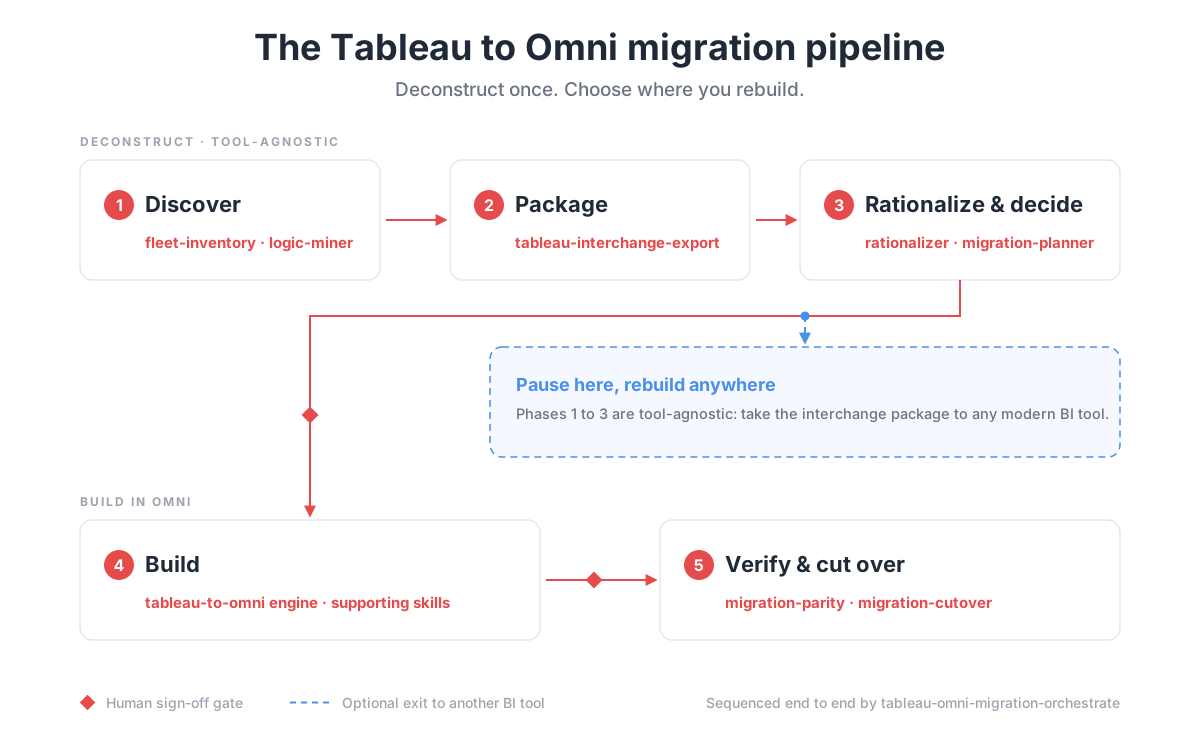
The narrative below groups the work into six reader-friendly stages. The actual execution is more granular. tableau-omni-migration-orchestrate sequences everything here against a shared migration manifest and resumes cleanly: invoke it and follow its gates. To run the phases by hand, or to understand what the orchestrator is doing, this is the order.
- Phase 1: Discover (read-only against Tableau)
tableau-omni-fleet-inventory: crawls the estate (workbooks, views, datasources, owners, 30-day usage, lineage) and downloads workbook filestableau-omni-workbook-dossier: renders one human-readable dossier per workbook from the parsed IRtableau-omni-logic-miner: mines calc formulas, custom SQL, and parameters fleet-wide and clusters duplicatesdata-context-builder: reconciles the mined logic into a canonical context, one winning definition per business term, with provenance
- Phase 2: Package
tableau-interchange-export: freezes the estate into a tool-agnostic interchange package (inventory, SQL and relations, logic with conflict status, deterministic chart intents, rebuild specs). Verify the zero-target-tool-vocabulary guarantee with the grep it documents
- Phase 3: Rationalize and decide
migration-rationalizer: triages the package into duplicative, improvable, and transfer verdictstableau-omni-migration-planner: stack-ranks Keep / Consolidate / Retire / Rebuild and records the human sign-off. Do not skip the sign-off; downstream skills check for it
- Phase 4: Build (writes to Omni, on an isolated branch)
tableau-omni-connection-migrator: maps deduped Tableau connections to Omni connectionstableau-omni-source-landing: lands file-backed sources (extracts, CSV, Excel) as warehouse tables, with reconciliation checkstableau-omni-topic-consolidate: collapses datasources sharing a fact table into one canonical topicomni-semantic-layer-setup: adds descriptions, relationships, ai_context, and sample queriestableau-to-omni: rebuilds each signed-off dashboard on a migration branch from a spec, then imports, seeds, and validates. Runtableau-omni-topic-maintenancefirst; it refuses to build onto an existing duplicate-topic clustertableau-omni-chart-mapper: the engine's viz rulebook; consult it when a tile flags manualtableau-omni-security-migrator: ports users, groups, permissions, and row-level security over SCIM
- Phase 5: Verify and cut over
tableau-omni-migration-parity: diffs every migrated number against Tableau baselines snapshotted at discovery. Failures block promotiontableau-omni-migration-cutover: sets folders, naming, labels, owners, and schedules; writes a disposition ledger per workbook; supports rollbacktableau-omni-metrics-catalog: publishes the closing metrics dictionary from the canonical contexttableau-omni-topic-maintenance: runs as a steady-state health sweep after cutover
Why this cannot, and should not, be fully automated
It would be technically possible to point the tooling at your estate and let it copy every workbook into Omni untouched. That is exactly what you should not do. A fully automated lift-and-shift just copy-pastes your old environment into your new one, duplicate sources, dead dashboards, conflicting metric definitions and all. You would spend the effort of a migration and arrive with the same mess in a nicer tool, which is the second fear on the list coming true on purpose.
A migration is the rare moment your team has permission to ask "should this even exist, and can it be better?" of every asset at once. That question needs a human. Someone has to decide what genuinely needs to move, what quietly gets retired, and where a rebuild beats a translation. No script should make those calls, because they are business decisions, not mechanical ones.
That is the whole point of building out this suite. It is not here to remove people from the migration. It is here to remove the tedious, monotonous part (reading XML, deduplicating sources, transcribing charts, moving content from one place to another) so your people spend their time on the strategic decisions that actually compound: what the metrics mean, what deserves to survive, and how the new platform can be better than the old one. That is where outsized business value and impact come from, not from hand-copying dashboards.
Phase 1: Discover
The fleet-inventory skill crawls your Tableau Cloud or Server estate over the REST and Metadata APIs and writes down everything: every workbook, every view, every data source, who owns it, which physical warehouse tables it touches, and (this is the important one) real 30-day view counts. It also downloads every workbook file so the rest of the pipeline can work even on a pure Cloud estate, and sweeps up the governance layer: subscriptions, data alerts, Prep flows, certifications, tags.
This phase alone dissolves most of the timeline fear. The reason nobody can estimate your migration today is that nobody actually knows what is in the estate. After discovery you know exactly how many workbooks exist, how many anyone has opened in the last month, and how many distinct fact tables sit underneath all of it. Scope stops being a rumor.
Phase 2: Decide what migrates
The migration-planner skill stack-ranks every workbook from the inventory and proposes a bucket for each: Keep (migrate as is), Consolidate (merge with its near-duplicates), Retire (nobody has opened it since last fiscal year), or Rebuild (worth doing properly rather than translating). Scoring blends usage, decision value, definition cleanliness, and effort. It then clusters the survivors into migration waves batched by shared physical table, so related content moves together.
Here is the first human gate, and it is non-negotiable: every workbook that migrates needs a named person's sign-off. The pipeline suggests buckets; it never decides what your business keeps. In every estate we have run this on, a meaningful slice of the fleet lands in Retire, which means the honest answer to "how long will the migration take" is: shorter than you think, because you are not migrating the dead weight.
Phase 3: Consolidate the data sources
Fear number two is "we will recreate the same mess in Omni." This phase exists specifically so you don't, and it is the part of the pipeline I would defend hardest.
Two branches run in parallel:
-
logic-minerreads every calculated field formula, every block of custom SQL, every parameter, and every datasource definition across the whole fleet, then clusters them. When "gross margin" is implemented three different ways in three workbooks, it surfaces the three formulas side by side with a conflict flag. A human picks the winner; the pipeline never guesses which definition is right. The reconciled result becomes the canonical business context every later phase builds from. -
topic-maintenanceandtopic-consolidatehandle the data-source side. When five Tableau data sources all sit on the same physical fact table (they always do), consolidate merges them into one canonical Omni topic with a documented field-resolution waterfall, built on a branch so you can review it before it exists anywhere real.
The output of this phase is also your first piece of net-new value, before a single dashboard has moved: metrics-catalog publishes a metrics repository indexed by business problem. Blessed definition, owner, source topic, which dashboards reference it. Most teams have never had this artifact for their Tableau estate. The migration produces it as a side effect.
Phase 4: Migrate the content
Now the actual move. The tableau-to-omni engine (the same one from the single-workbook post) takes one workbook end to end: unpack the XML, translate the calculations, map every worksheet to the right Omni visualization, assemble the dashboard, deploy it via the CLI. The orchestrator fans it out in parallel across a wave, one engine run per workbook, checkpointing progress after every workbook so a killed run resumes exactly where it stopped.
The move is not just the charts. The folder structure, content organization, and dashboard naming conventions you already built in Tableau carry over too, so you are not standing in a fresh Omni instance re-creating the hierarchy your team spent years arranging. The taxonomy you know is preserved, which means people can find what they are looking for on day one instead of relearning where everything lives.
A cluster of supporting skills handles the parts of a real estate that a demo never shows you:
workbook-dossierrenders each workbook into a human-readable document (every formula, filter, layout zone, and security artifact) so reviewers never have to open raw XML.chart-mapperis the rules library that decides which Omni visualization each Tableau worksheet becomes, emits a fidelity note per chart, and routes anything it cannot translate cleanly to a review queue instead of guessing. It goes beyond the chart type Tableau happens to have saved. A huge share of Tableau worksheets ride on "Show Me," Tableau's automatic chart picker, so the marks in the file are whatever Tableau auto-selected. The mapper reads the shelf and encoding signature, works out which chart type Tableau's own documented "Show Me" logic would suggest for that field combination, records that as the intended visualization, then finds the Omni equivalent. You get the chart the author meant, not a literal transcription of whatever default was sitting in the XML.connection-migratorinventories and dedupes every data connection and produces an admin runbook for the ones that must be created in the Omni UI. It flags credential gaps and never touches credential values.source-landingdeals with the skeletons: embedded extracts, CSVs, Google Sheets, and federated blends get materialized into proper warehouse tables with lineage, so file-backed workbooks migrate instead of getting punted.security-migratorports users, groups, permissions, and row-level security, mapping each Tableau rule to the matching Omni primitive. Row-level security transitions to Omni's concept of user attributes, which can be enforced at multiple levels of granularity (from the connection down to an individual view) depending on how sensitive the data is and the behavior you want. Every RLS rule requires named human sign-off before it applies. Nobody should automate away accountability for who sees what.
Phase 5: Verify and audit
migration-parity is fleet-scale QA. For every migrated workbook it snapshots Tableau-side truth (the embedded extract, or warehouse SQL pinned to a timestamp for live connections), runs the live Omni query behind every tile, and diffs the numbers. Any metric off by more than 0.5% halts that workbook's promotion until someone root-causes it. It also runs per-persona row-count checks against the migrated row-level security, so "does the regional manager see only her region" is a tested assertion, not a hope.
This is the answer to the quiet version of fear number two: "will the numbers be wrong in the new tool?" Nothing gets promoted on vibes. Parity is a gate, and the gate has a tolerance written down.
Verification does not stop at dashboards, because by this point you are holding something Tableau never gave you: a canonical, parity-checked dataset with proper AI context attached. Every consolidated topic carries the blessed metric definitions and sample queries mined in Phase 3, which is exactly what Omni's AI chatbot needs to answer questions in a quick, auditable fashion. Auditable is the operative word: every answer resolves to a real query against the semantic layer, so anyone can open the query behind the answer and check it, instead of trusting a black box.
And because the chatbot is now a query surface your business will rely on, we treat it like one: it gets evaluated, not assumed. We build a question bank from the questions your estate actually answers (mined from the most-viewed dashboards and the metrics catalog), pair each question with its known-correct answer from the parity-checked data, run the bank through the chatbot, and score the results. You get an accuracy number for AI-generated answers on your data and your definitions, not a vendor demo on a toy dataset. Questions that miss get triaged the same way a failed parity tile does: usually the fix is sharper AI context on the topic, and the eval reruns until the score holds.
Phase 6: Sunset the legacy environment
migration-cutover operationalizes the new footprint: folder taxonomy, naming, owners, certified-content labels, permission defaults. It recreates Tableau subscriptions and data alerts as Omni schedules, bulk-provisions missing recipients, verifies the permission collapse with a before-and-after exposure report, and runs the communication runbook on the schedule you agreed on, so the estate is deprecated in a way everyone saw coming, not by surprise. Final gate: the engagement owner approves the cutover comms before anything is switched off.
The conductor
migration-orchestrate sequences all of the above from one shared manifest. Every phase writes its state there, which buys you two things worth caring about. First, resumability: kill the process at any point and the next run computes exactly what remains and continues. Second, an audit trail: every sign-off, every parity result, every retired workbook has a row with a name on it. And for teams that have not committed to a target yet, there is a tool-agnostic side door: interchange-export packages the whole estate (logic, SQL, chart intents, rebuild specs) with zero Omni references inside, and migration-rationalizer scores what transfers cleanly into any target BI tool. You can run discovery and rationalization before you have signed anything with anyone.
The honest split: automated vs. human
| The pipeline does this | You do this |
|---|---|
| Inventories the estate with real usage numbers | Sign off on what migrates, consolidates, and retires |
| Extracts every calc, custom SQL block, and parameter | Pick the winning definition when metrics conflict |
| Merges duplicate data sources into canonical topics | Confirm each canonical topic before it is built |
| Rebuilds dashboards in Omni, in parallel waves | Polish layout, formatting, and look and feel |
| Diffs every tile's numbers against Tableau truth | Root-cause the rare tile that fails parity |
| Ports security and recreates schedules | Sign off on every row-level security rule and the cutover comms |
The metric-definition row deserves expansion, because it is the human work with the highest leverage. When the logic miner finds "gross margin" implemented three ways, a human has to choose between the definitions; no pipeline should guess what your business means. Sometimes one definition wins and the others die. But sometimes multiple definitions are legitimately kept (finance recognizes revenue one way, sales counts bookings another), and then the human work is to catalog the why behind each one, set the naming convention that keeps them distinguishable, and write the AI context for each. That last part matters more than it sounds: it is what makes the chatbot era work. When someone asks about a metric, they get the proper definition for what they are trying to do, because the reasoning was written down instead of living in one analyst's head.
Notice the shape of the right column. It is decisions and polish, not labor. The tedious 80% (reading XML, translating logic, deduplicating sources, rebuilding charts, checking numbers) is exactly the part machines are good at and humans burn out on. The remaining 20% is the part you would never want to delegate anyway: what your metrics mean, who sees what, and whether the dashboard looks the way your executives expect. Chart translation gets you a faithful, working dashboard; making it feel native to Omni (spacing, formatting details, the color story, the small layout choices that make a dashboard feel designed rather than ported) is human work, and the dossier and fidelity notes tell you exactly where to spend it.
The three fears, revisited
"Nobody can tell us the timeline." After Phase 1 (which takes days, not weeks), the timeline is arithmetic: number of workbooks that survive the planner, divided into waves, with parallel engine runs per wave. You get a defensible estimate before you commit to anything, and the retire bucket usually makes it smaller than the number in your head.
"We'll recreate the same mess." The pipeline structurally prevents it, because consolidation of data sources is a first-class citizen: a phase the orchestrator will not skip, sitting in front of the build, not an optional cleanup sprint that gets cut when the project runs long. Duplicate sources merge before anything is built on them, and conflicting definitions must be resolved by a named human before the engine runs. I will be straight with you: this is the part of the migration that takes genuine extra effort to do correctly, because it is where people have to make decisions instead of letting the machine grind. It is also the effort that pays dividends for years. Every downstream dashboard sits on one clean topic instead of five overlapping sources, and when your team starts asking Omni's AI chatbot questions, the answers are reliable because there is exactly one blessed definition (or several, deliberately named and documented) for the chatbot to reach for. Skipping this phase is how you end up with an AI that confidently gives three different numbers for revenue.
"Do we actually get anything new?" Three things you did not have before, all produced by the migration itself: a metrics catalog indexed by business problem, with owners; a semantic layer where each fact table has one canonical topic instead of five overlapping data sources; and that same mined business context seeded into Omni's AI features, so natural-language queries against your data start from your reconciled definitions rather than a blank slate. The migration is not the price you pay for the new tool. It is the event that forces the cleanup you have owed yourselves for years, with the tedium delegated.
If you are on the fence, the useful first step costs almost nothing: run discovery and planning against your own estate and look at the numbers. Worst case, you decline to migrate and walk away with a complete, usage-ranked inventory of your Tableau estate. Either way, you come out with a clear picture of exactly how much work needs to be done and, just as important, where that work needs to happen.
Josh